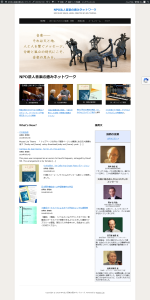
CSS消去前
Museo Lite Theme
* トップページ以外の「個別ページ」の冒頭にある巨大画像を消す */
body:not(.home) .entry-thumbnail,
body:not(.home) .post-thumbnail {
display: none !important;
}
/* 3面ブロックの画像の外枠と大きさを完全に統一する */
.featured-pages .entry-thumbnail,
.featured-pages .entry-thumbnail a {
display: block !important;
height: 200px !important; /* 枠全体の高さを200pxに固定 */
overflow: hidden !important; /* 枠からはみ出た画像をカット */
}
.featured-pages .entry-thumbnail img {
width: 100% !important;
height: 100% !important; /* 縦横比を無視せず枠いっぱいに広げる */
object-fit: cover !important; /* 写真の中央を中心に綺麗に切り抜く */
}
ーーーーーーーーーーー
/* 1. 箇条書きBOX(ul)の下側余白を完全消去 */
ul.KsbFXc.U6u95 {
margin-bottom: 0 !important;
padding-bottom: 0 !important;
}
/* 2. 【大本命】区切り線(hr)の巨大な上下余白を完全消去 */
hr.j3tEEe {
margin-top: 0 !important;
margin-bottom: 0 !important;
display: none !important; /* もし線自体が不要なら完全に非表示にします */
}
/* 3. 一番下にある空のBOXの余白を完全消去 */
div.n6owBd.awi2gc {
margin-top: 0 !important;
margin-bottom: 0 !important;
padding-top: 0 !important;
padding-bottom: 0 !important;
line-height: 0 !important;
height: 0 !important;
}
/* 4. WELCOMEウィジェットと3面ブロック全体の枠も密着させる */
.welcome-area,
#sidebar-homepage-welcome {
padding-bottom: 0 !important;
margin-bottom: 0 !important;
}
.featured-pages,
.featured-pages-section {
margin-top: 0 !important;
padding-top: 0 !important;
}
/* ページタイトル変更 */
.page-title {
font-size: 1.5rem;
text-align: center;
}